JotCalc

A notepad that does the math.

Type lines like rent = $2,150, 48 in to cm or 0.05 BTC in EUR. Each answer appears beside its line and stays current as you edit.

Free. Works offline. No account.

Free
No sign-up, no trial, no ads. Open it and start typing.
Works offline
After the first visit, JotCalc runs with no connection at all.
Private
Sheets are saved in your browser, never on a server.
Computer and phone
A full desktop layout, and a phone layout with a calculator keypad.

What JotCalc does

Write the way you would on paper. JotCalc reads money, measurements and dates, and does the arithmetic as you go.

Currencies and crypto

Money converts itself.

Write €145 or 0.05 BTC and JotCalc fills in what it is worth. Add in GBP to any line to see it in another currency. Exchange rates are fetched when you open the app and saved, so money lines keep working offline.

Currencies
USD EUR GBP JPY CAD AUDOr the signs $ € £ ¥
Crypto
BTC ETH SOL XRP DOGEOr names like bitcoin and ether
On its own
A coin or currency on its own line shows what one is worth in dollars

Rates from the European Central Bank (via Frankfurter) and CoinGecko.

A sheet called Holiday money: 145 euros, 400 pounds in dollars, 12,000 yen in euros, 250 Canadian dollars in Australian dollars, the price of one bitcoin, 0.05 BTC in euros, 2 ETH in pounds, 500 dollars in Solana and 1,500 Dogecoin in dollars, each converted at the day's rates.

Units and measurements

Measurements convert as you type.

Lengths, weights, volumes, temperatures, areas, speeds, data sizes and times. Mix units in one line and end it with to or in to get the answer in the unit you want. Every line below was worked out by JotCalc.

Kitchen

  1. 2 cups to ml473.18 mL
  2. 3 tbsp to ml44.36 mL
  3. 350 °F to °C176.67 °C
  4. 1.5 lb to g680.39 g

Travel

  1. 26.2 mi to km42.16 km
  2. 60 mph to kph96.56 km/h
  3. 1 gallon to liters3.79 L
  4. 72 °F to °C22.22 °C

Home and workshop

  1. 48 in to cm121.92 cm
  2. 6 ft + 2 in to cm187.96 cm
  3. 100 m2 to ft21,076.39 ft²
  4. 1 mile to ft5,280 ft

Data and time

  1. 25 GB to MB25,000 MB
  2. 1 TB to GB1,000 GB
  3. 2 weeks to hours336 h
  4. 90 min to hours1.5 h

On your phone

Made for small screens too.

On a phone, JotCalc brings its own keypad, with the symbols a calculator needs and a row of the units and names already in your sheet. Your sheets open full screen, pinned ones first.

Install it on your phone and it opens like any other app, offline included.

JotCalc on a phone: a Conversions sheet with cups to millilitres, Fahrenheit to Celsius, miles to kilometres, inches to centimetres and a 500 GB download at 100 Mbps, above a calculator keypad.
The sheet list on a phone, with Lisbon trip and Kitchen remodel pinned at the top and recent sheets below.

Sheets

A sheet for every job.

Keep the trip budget, the remodel and the invoice apart. Pin the sheets you use most and find any sheet by name or by what is in it. Start a section with ## and it gets its own subtotal. The summary adds up the whole sheet and shows each section's share.

The Kitchen remodel sheet with sections for cabinets, counters, labor and finishing, each with a subtotal. The sheet list on the left has two pinned sheets and five recent ones, and the summary on the right shows the total and each section's share.

Commands and shortcuts

Everything is a keystroke away.

Press ⌘K to find a sheet or run a command. Export, import, pin, switch themes and open settings without reaching for the mouse.

⌘K
Search or run a command
⌘N
New sheet
⌘F
Find a sheet
⌘.
Show or hide the summary
⇧⌘C
Copy the answer on this line
⌘/
Every shortcut
The command palette open over a sheet, listing actions: export as CSV, JSON or HTML, export all sheets as a backup, import a text file, new sheet, find a sheet, copy this line's value, pin and delete.

Themes and type

Light, dark, and four typefaces.

Pick Light or Dark, or Auto to follow your system as it changes through the day. Set your sheets in Mono, Sans, Serif or your system's own font, at the size that suits your eyes.

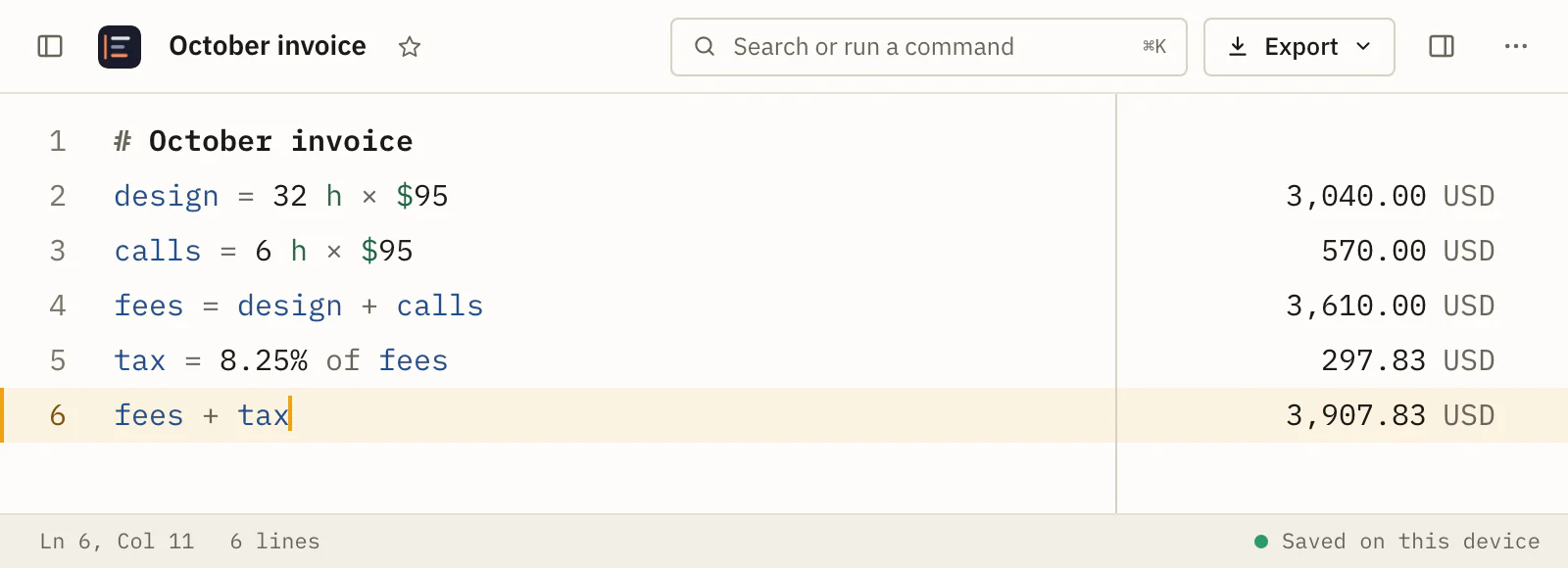
  • An invoice sheet in the light theme, set in Mono. Light, Mono
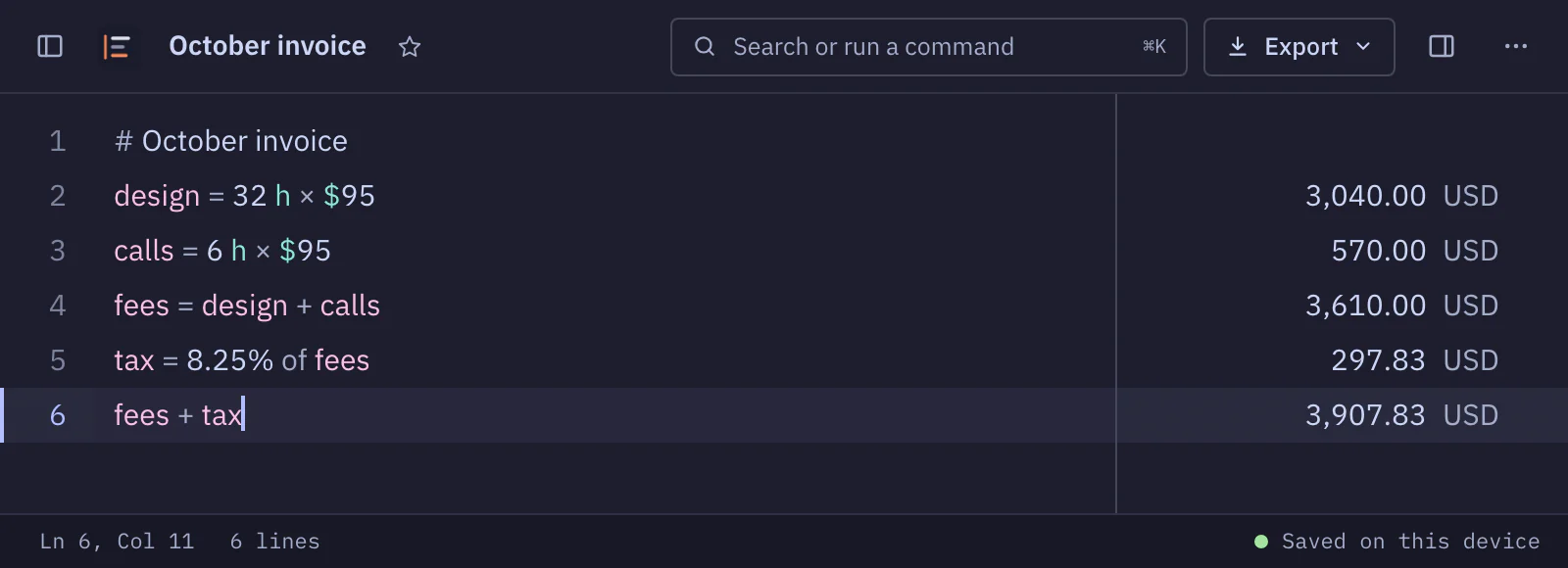
  • The same invoice in the dark theme, set in Sans. Dark, Sans
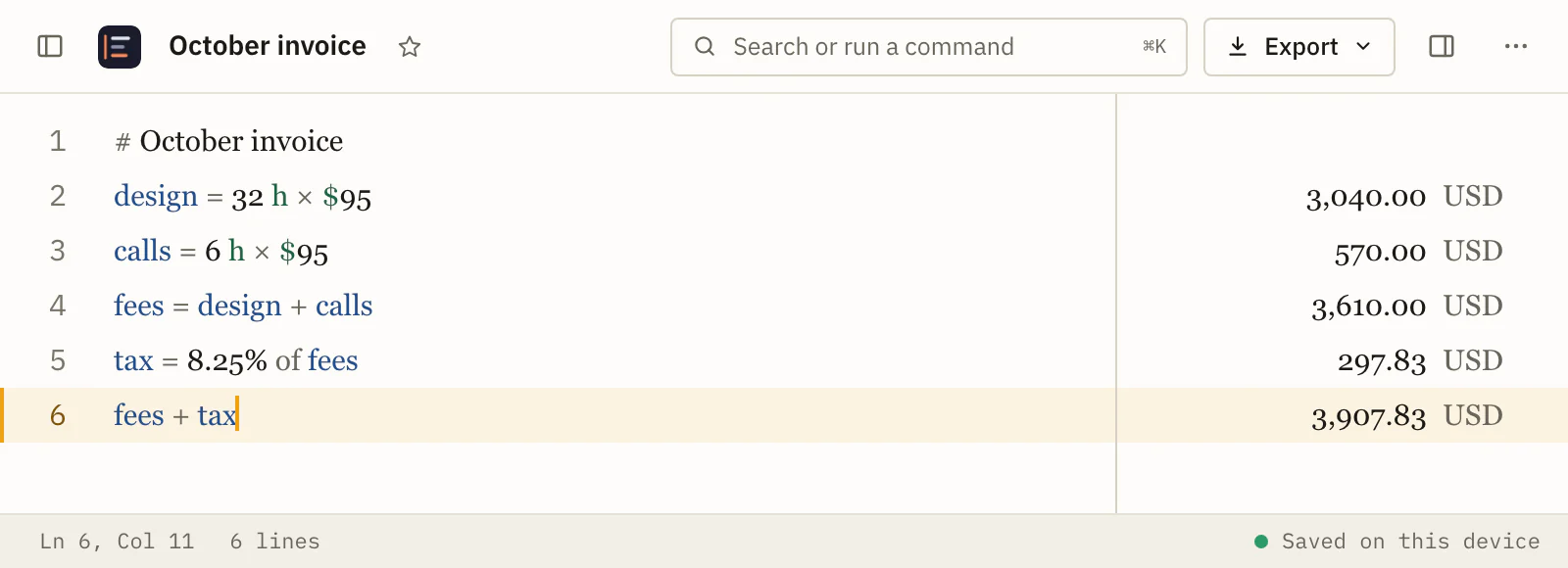
  • The invoice in the light theme, set in Serif. Light, Serif
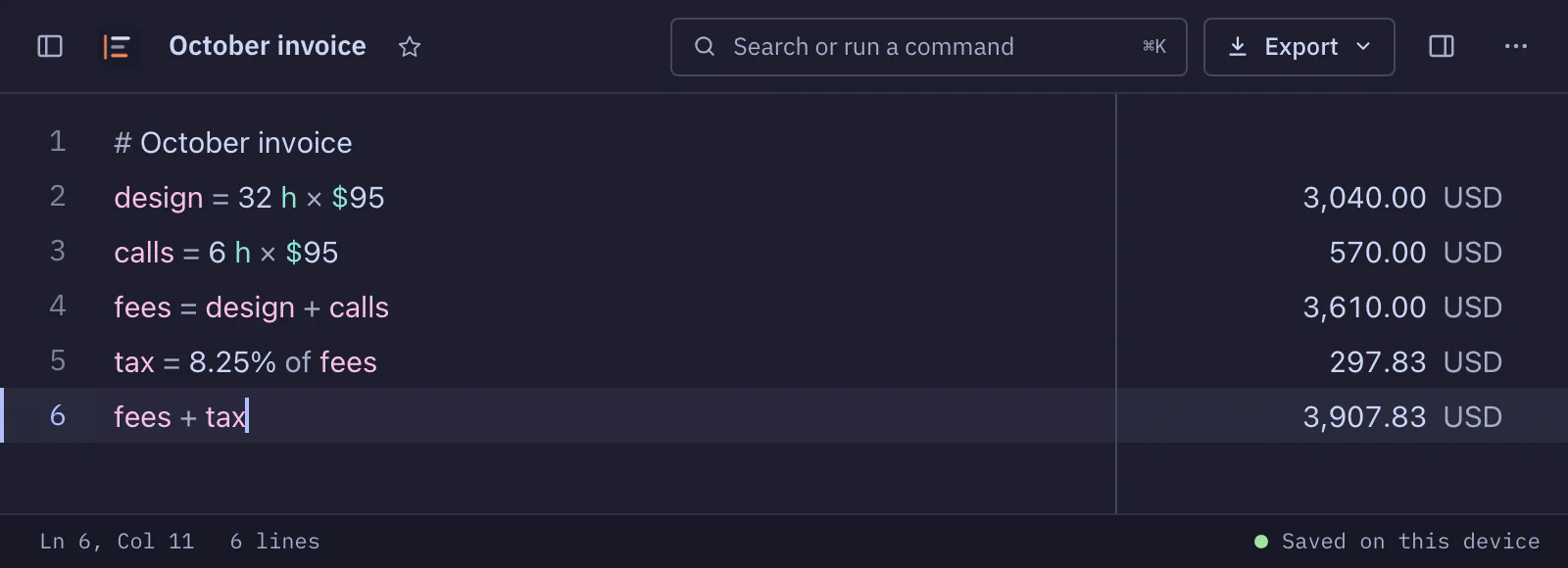
  • The invoice in the dark theme, set in the system font. Dark, System

And the everyday things a calculator should know

Dates

Add days, weeks or months. The end of a month lands on the right day.

  1. Jan 31 2027 + 1 monthFeb 28 2027
  2. Mar 12 2027 + 6 daysMar 18 2027

Percentages

Percent of, percent off, and plus or minus a percent, the way you say them.

  1. 20% of 8016
  2. 20% off $8064.00 USD
  3. $4,800 − 15%4,080.00 USD

Names for numbers

Name a value once and use it on any line below.

  1. rent = $2,1502,150.00 USD
  2. rent × 1225,800.00 USD

Line references

Point at another line by its number. The reference follows the line if you move it.

  1. $1,2501,250.00 USD
  2. line1 × 1215,000.00 USD

Hours and shorthand

Hours times a rate is money. Write a million as 1.2M.

  1. 38 h × $953,610.00 USD
  2. 1.2M ÷ 12100,000

Also

  • Suggestions for names, units and functions as you type. Press Tab to take one.
  • Click any answer to copy it.
  • Import a text file. Export a sheet as CSV, JSON or HTML, or every sheet as one backup.
  • Sheets save as you type.

Use it in your browser, or install it

JotCalc runs in any current browser with nothing to download. Installing it gives it an icon in your Dock, taskbar or Home Screen and its own window. Install it on as many computers and phones as you like.

The address jotcalc.io/app
Open

Safari

Mac macOS Sonoma 14 or later

  1. Open jotcalc.io/app in Safari.
  2. Choose File > Add to Dock, or click the Share button and choose Add to Dock.
  3. Click Add. JotCalc appears in your Dock and in Applications.

iPhone and iPad

  1. Open jotcalc.io/app in Safari.
  2. Tap the ⋯ button, then Share. If your tabs sit at the top or bottom of the screen, tap the Share button instead.
  3. Scroll down and tap Add to Home Screen.
  4. Leave Open as Web App on, then tap Add.

Safari keeps an installed JotCalc's sheets apart from its browser tabs, so the installed app starts with an empty sheet list. Safari can also clear data for websites you have not visited in a while, which makes the Dock or Home Screen app the safer home for your sheets.

Chrome

Computer Windows, Mac, Linux, ChromeOS

  1. Open jotcalc.io/app in Chrome.
  2. Click the Install icon at the right end of the address bar. Or open the ⋮ menu, choose Cast, save, and share, then Install JotCalc (on some versions, Install page as app).
  3. Click Install. JotCalc opens in its own window.

Android

  1. Open jotcalc.io/app in Chrome.
  2. Tap the ⋮ menu, then Install and create shortcut. Older versions call it Add to Home screen.
  3. Tap Install.

iPhone and iPad

  1. Open jotcalc.io/app in Chrome.
  2. Tap the Share button at the right of the address bar.
  3. Tap Add to Home Screen, then Add.

In Chrome, the installed app and your Chrome tabs share the same sheets.

Brave

Computer Windows, Mac, Linux

  1. Open jotcalc.io/app in Brave.
  2. Click the Install icon at the right end of the address bar. Or open the ≡ main menu, choose Save and share, then Install JotCalc.
  3. Click Install. JotCalc opens in its own window.

Android

  1. Open jotcalc.io/app in Brave.
  2. Tap the ⋮ menu, then Install app. Some versions call it Add to Home screen.
  3. Tap Install.

iPhone and iPad

Brave on iPhone and iPad can't add web apps to the Home Screen. Use JotCalc in a Brave tab, or open jotcalc.io/app in Safari and follow the Safari steps to install it.

On a computer or Android, the installed app and your Brave tabs share the same sheets.

Many devices, one free app

Each computer and phone keeps its own sheets. There is no account and no sync, so nothing you write leaves the device. To carry a sheet across, copy its lines and paste them into JotCalc on the other device, or save them as a text file and import it.

Updates arrive on their own

The next time you open JotCalc with a connection, you get the newest version. It tells you what changed, and Settings keeps the full list.

Privacy

Your sheets stay on your device.

JotCalc has no account and no analytics. Sheets are saved in your browser as you type and are never sent anywhere. Export every sheet as one backup file whenever you like.

Apart from loading the app itself, JotCalc makes two kinds of request, both for exchange rates:

  • api.frankfurter.devCurrency rates from the European Central Bank.
  • api.coingecko.comCrypto prices, all coins in one request.

Neither request contains anything you typed. Rates are saved on your device, so conversions keep working offline. The fonts ship with the app.

Open a sheet and start typing.

Open JotCalc

Free, in Safari, Chrome, Brave and other current browsers.